

🔋 Faster, easier, and unified access
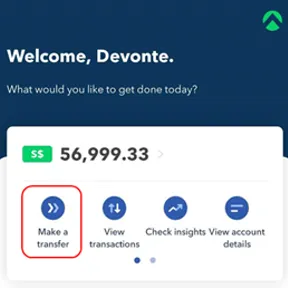
On the home screen, both the previous ‘Make a local transfer’ and ‘Make an FX transfer’ buttons have been merged into a unified ‘Make a transfer’ button.
By clicking on the ‘Make a transfer’ button, you’ll be taken to the new unified transfer flow that allows you to make both local or international transfers via our payment partners.
🧭 Clearer terminology and a single search experience

We’ve renamed the term ‘Business Partner’ to ‘Recipient’, to better reflect the usage of transfers - we learnt from talking to our users that businesses may make payments to parties beyond their business partners, to a wider pool of recipients including employees, government organisations, just to name a few. We’ve made sure that your existing transfer recipient details are unaffected.
Furthermore, to give our users a better way to manage their recipients, you’ll now be able to find both local and international recipients within the same ‘Select recipient’ screen. You can search for the relevant recipient by name, account number or even currency. Now you’ll never have to scroll through your recipient list again!

The term ‘Description’ has also been renamed to ‘Reference’ to give our users familiarity with commonly used transfer terms. Transaction references will be reflected on the recipient's receiving bank statement.
🌏 Simplified process to add new recipient
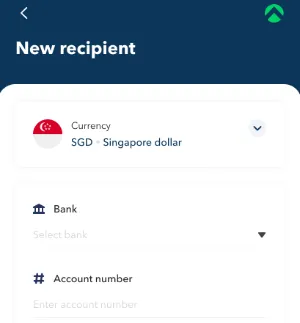
When adding a new recipient, you'll now be taken to a unified "New Recipient" screen where you’re able to add either a new local or international recipient.
The destination currency is set as Singapore dollar (SGD) by default and you can select the relevant foreign destination currency if you'd like to create a recipient for an international transfer.
Once done, you’ll see a country flag appearing beside each recipients’ icon which indicates their destination currencies. For future transfer purposes, you can quickly identify the correct recipient by looking at those country flags.
That’s all for our latest transfer flow update!
If you’ve feedback to share or if you’d like to see more new product features, do let us know over here.
.webp)


.webp)